![apifon-full-lock-up-purple-1.png]](https://kb.apifon.com/hs-fs/hubfs/apifon-full-lock-up-purple-1.png?height=40&name=apifon-full-lock-up-purple-1.png)
What is Reveal OTP Message Masking?
Reveal OTP Message Masking allows you to define how one-time passwords (OTP codes) are displayed inside report tracking and campaign tracking on the Apifon platform.
Why it’s useful
This feature gives the account administrator full control over which platform users can view OTP codes used for login flows, verifications, or digital transactions.
It is especially valuable for accounts with multiple users or companies with strict security and compliance requirements.
Where to find OTP Message Masking on the Apifon platform
-
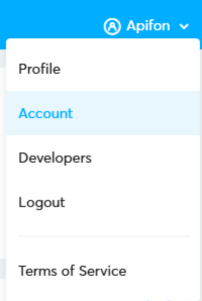
Click your Account Name.
-
Go to the Account section.
-
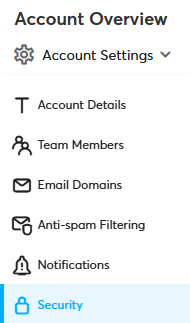
In Account Overview, select Account Settings.

-
Click Security.
-
In the pop-up window, under 2FA, you will find the Reveal OTP Message Masking options.
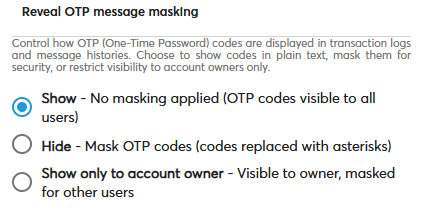
Available Options
1. Show
OTP codes are visible to all users.
Useful when:
– The account is managed only by admins or trusted technical users.
2. Hide
OTP codes are fully masked with asterisks (****) and not visible to any user.
Useful when:
– You want to prevent sensitive information from being exposed to everyone.
3. Show only to the account owner
OTP codes are visible only to the account owner.
All other users see the masked version (****).
Useful when:
– The team has multiple members, but only the owner needs full visibility.
– You must comply with specific security or compliance policies.
Now you know how to utilize the Reveal OTP Message Masking feature on the Apifon platform!
Thank you for reading!