---
title: How many messages can I send with my current balance?
description: To find out how many messages your current balance allows, follow these steps to locate your price list and calculate the number of messages. Navigate to Account Name > Account. In the Account Overvie
---
[Skip to content](https://kb.apifon.com/how-many-messages-does-my-balance-correspond-to#main-content)
- [English](https://kb.apifon.com/how-many-messages-does-my-balance-correspond-to)
- [Ελληνικά](https://kb.apifon.com/el/so-posha-minimata-antistoichei-to-ypoloipo-mou)
English
Show submenu for translations
![apifon-full-lock-up-purple-1.png\]](https://kb.apifon.com/hs-fs/hubfs/apifon-full-lock-up-purple-1.png?height=40&name=apifon-full-lock-up-purple-1.png)
Open main navigation
Close main navigation
- - [English](https://kb.apifon.com/how-many-messages-does-my-balance-correspond-to)
- [Ελληνικά](https://kb.apifon.com/el/so-posha-minimata-antistoichei-to-ypoloipo-mou)
English
Show submenu for translations
- [apifon.com](https://www.apifon.com/)
[apifon.com](https://www.apifon.com/)
How can we help you today?
- There are no suggestions because the search field is empty.
1. [Knowledge Base](https://kb.apifon.com/?hsLang=en)
2. [FAQs](https://kb.apifon.com/faqs?hsLang=en)
# How many messages can I send with my current balance?
To find out how many messages your current balance allows, follow these steps to locate your price list and calculate the number of messages.
### **Steps to locate your Price List**
1. Navigate to **Account Name \> Account**.
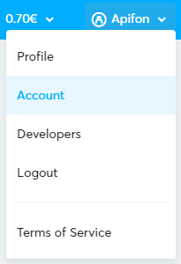
2. In the **Account Overview** section, click on **Price List**.

3. **Find Your Current Price List:**
On this page, you will see the pricing information associated with your account.
4. **Review Pricing Details:**
Check the pricing details for each communication channel (e.g., Viber, SMS, Email) and for each country, or review the pricing details specific to your billing plan.
On the Pricing page, you will find details such as **Description**, **Valid From**, **Valid To**, and whether the price list is marked as **Active**.
### **How to calculate the number of messages**
1. Determine the cost per message for your selected channel and destination using the price list.
2. Divide your current account balance by the cost per message.
#### **Example Calculation for SMS:**
- **Balance**: €62
- **Cost per SMS**: €0.05
- **Number of Messages**: (€62/1.24) ÷ €0.05 = **1,000 SMS**
SMS charges are based on each **message sent**, not on whether the message is delivered.
Please note that the available balance includes VAT.
#### **Calculate balance for Viber**
Check the available**[Viber subscription balance](https://kb.apifon.com/what-is-the-difference-between-account-balance-and-viber-subscription-balance?hsLang=en) to calculate the number of messages that correspond to your monthly Viber subscription balance.**
***For example:***
- **Viber Subscription Balance:** €175 (monthly balance)
- **Cost per Viber message:** €0.025
- **Number of Messages**: €175 ÷ €0.025 = 7.000 **Viber Messages**
**Exceeding the Monthly Subscription Balance**:
If you exceed the monthly Viber subscription balance, additional messages will be charged separately.
***For example:***
- **Total Messages Sent**: 7,500 (an excess of 500 messages)
- **Cost per Additional Viber Message**: €0.025
- **Total Cost for Additional Messages**: 500 × €0.025 = €12.50
- The cost per Viber message varies depending on whether the message is **Promotional** or **Transactional**.
- Only **delivered Viber messages** are charged.
### Calculate Viber Failover to SMS
If a percentage of your campaign uses SMS as a fallback to Viber (Failover), calculate the total cost based on a hypothetical scenario.
**Failover to SMS Hypothetical Scenario**:
- Campaign size: 8,000 messages
- Distribution:
- **70% Viber**: 8,000 × 70% = 5,600 Viber Messages
- **30% SMS**: 8,000 × 30% = 2,400 SMS
- Costs:
- **Viber Promotional Price**: 5,600 × €0.025 = **€140**
- **SMS Price**: 2,400 × €0.05 = **€120**
- **Total Cost**: €140 + €120 = **€420**
VAT is not included.
Now you know how many messages you can send with your current balance! 🚀
Thank you for reading! 😊
- [Getting Started](https://kb.apifon.com/getting-started?hsLang=en)
- [Account & Billing](https://kb.apifon.com/account-billing?hsLang=en#main-content)
- [Account Management](https://kb.apifon.com/account-billing?hsLang=en#account-management)
- [Billing & Payments](https://kb.apifon.com/account-billing?hsLang=en#billing-payments)
- [Security & Access](https://kb.apifon.com/account-billing?hsLang=en#security-access)
- [Email & Domain Security](https://kb.apifon.com/account-billing?hsLang=en#email-domain-security)
- [Campaigns](https://kb.apifon.com/campaigns?hsLang=en#main-content)
- [Campaign Management](https://kb.apifon.com/campaigns?hsLang=en#campaign-management)
- [Templates & Content](https://kb.apifon.com/campaigns?hsLang=en#templates-content)
- [SMS](https://kb.apifon.com/campaigns?hsLang=en#sms)
- [Viber](https://kb.apifon.com/campaigns?hsLang=en#viber)
- [Email](https://kb.apifon.com/campaigns?hsLang=en#email)
- [Landing Pages](https://kb.apifon.com/campaigns?hsLang=en#landing-pages)
- [Automations](https://kb.apifon.com/campaigns?hsLang=en#automations)
- [Integrations](https://kb.apifon.com/integrations?hsLang=en)
- [Lists](https://kb.apifon.com/lists?hsLang=en#main-content)
- [List Management Tools](https://kb.apifon.com/lists?hsLang=en#list-management-tools)
- [Forms](https://kb.apifon.com/lists?hsLang=en#forms)
- [Segmentation](https://kb.apifon.com/lists?hsLang=en#segmentation)
- [Reports & Analytics](https://kb.apifon.com/reports-analytics?hsLang=en#main-content)
- [SMS](https://kb.apifon.com/reports-analytics?hsLang=en#sms)
- [Viber](https://kb.apifon.com/reports-analytics?hsLang=en#viber)
- [Email](https://kb.apifon.com/reports-analytics?hsLang=en#email)
- [Tracking & Integrations](https://kb.apifon.com/reports-analytics?hsLang=en#tracking-integrations)
- [E-Commerce](https://kb.apifon.com/reports-analytics?hsLang=en#e-commerce)
- [FAQs](https://kb.apifon.com/faqs?hsLang=en)
[](http://apifon.com)
Copyright © 2026, Apifon S.A
```json
{
"@context" : "https://schema.org",
"@type" : "VideoObject",
"contentUrl" : "https://stream.mux.com/a8IxjIFWPr4DFpJBtDGt6ewio2vwc021tfC0001N44lC4s/capped-1080p.mp4",
"dateModified" : "2025-03-20T15:29:06.427Z",
"duration" : "PT2M3S",
"height" : 1080,
"name" : "Knowledge_Base_Videos_3 FAQs",
"thumbnailUrl" : "https://4135706.fs1.hubspotusercontent-na1.net/hubfs/4135706/Knowledge_Base_Videos_3%20FAQs.mp4/medium.jpg",
"uploadDate" : "2025-03-20T15:29:06.422Z",
"width" : 1920
}
```